default is the blog theme among the two official themes in the xfmpress repository, and the one you get right after npm i xfmpress: no plugins, no CSS of your own, just theme: 'default' and you have a complete personal blog. It does not chase visual drama — low-saturation jade, generous whitespace, reading first.
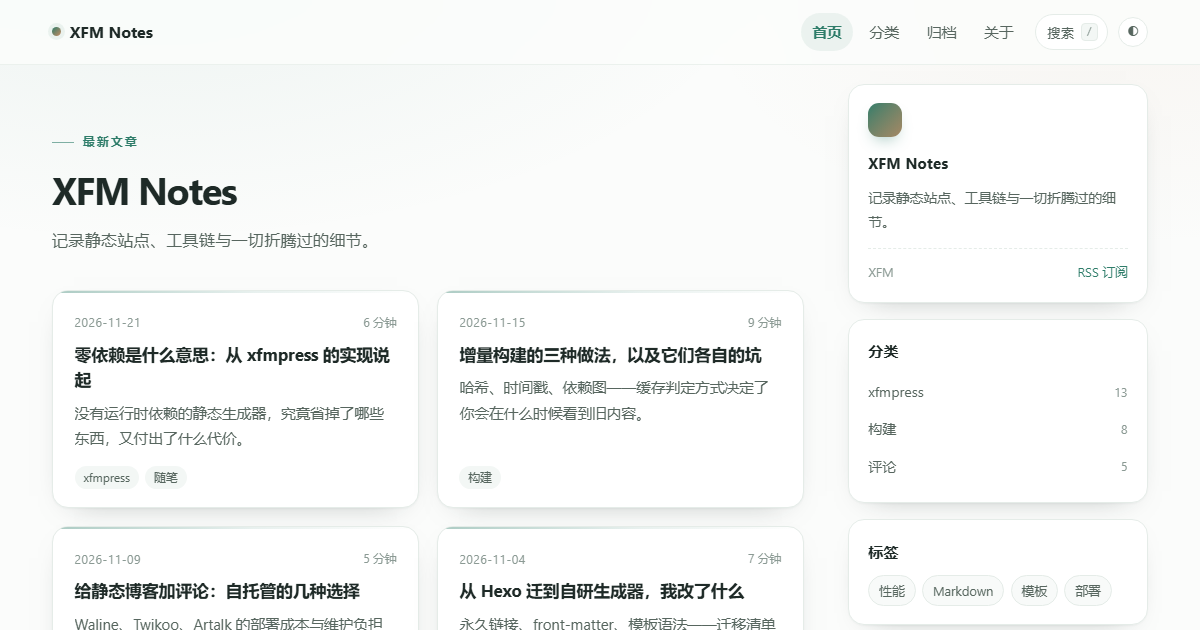
The image above is the theme rendered as-is at 1200×630: horizontal nav on top, a hero with the site title and description, a two-column card grid in the middle, and a sidebar with an intro card, categories, tags and an archive link. Every colour, radius and gap comes from the theme's own stylesheet — no extra customisation.
Layout map
themes/default/
├── layouts/
│   ├── base.html        # shell: header nav, main, footer, theme script
│   ├── index.html       # home: hero + card grid + sidebar
│   ├── post.html        # post: meta header, TOC, prev/next, related
│   ├── page.html        # standalone page (about, links)
│   ├── taxonomy.html    # /tags/x/, /categories/x/, /series/x/
│   ├── categories.html  # /categories/ index
│   ├── archives.html    # /archives/ by year
│   └── collection.html  # custom collection list (projects, …)
├── partials/            # post-list / pager / toc / lang-switcher
└── assets/              # style.css / search.js / toc.js / ux.js
Because the layout set is complete, turning on indexes in the config is enough to get a category index and a yearly archive — no template to write. Turn on collections and collection.html immediately picks up the custom section.
How the home page is put together
Three blocks, all in index.html:
- Hero —
site.titleplussite.description, with a small "latest posts" eyebrow; - Card grid — rendered by
post-list.html; each card carries date, title,post.desc(an auto-truncated excerpt whendescriptionis missing) and tags; - Sidebar — an about card (author + RSS), up to six categories, twelve tags, and an archive entry. The counters use
postsTotal, so on a multilingual site/en/shows the English post count, not the site-wide one.
Pagination comes from pagination.perPage and produces real static pages (/page/2/), not client-side slicing.
Reading details on a post
Body on the left, table of contents on the right. The TOC is only rendered when headings is non-empty, and toc.js highlights the current section as you scroll — a small thing that matters a lot in long articles. Below the body sit page.data.prev / page.data.next, and below those the related block computed by the plugin (tag 3 points, category 2, series 3). Without the plugin the block simply does not appear; nothing breaks.
Interactions and knobs
ux.js is about 3KB and does four things: copy buttons on code blocks, click-to-zoom images, a reading progress bar, and target="_blank" on external links — silently skipping anything a page does not have. With the search plugin installed, the nav gains a search button and Ctrl/⌘ + K opens a pure front-end filter panel fed by search.json.
Light and dark are CSS variables; the choice lives in localStorage under xfm-theme, and first-time visitors follow the system preference.
The cheapest way to restyle it is the variable block at the top of assets/style.css:
:root {
  --accent: #2f7d6a;   /* primary: jade */
  --warm: #c68b62;     /* accent */
  --radius: 16px;      /* card radius */
  --wrap: 760px;       /* measure */
}
When to pick it
Pick it for a personal blog, a build log, or a site you want online in ten minutes.
Skip it for a product manual that needs sidebar navigation (use docs) or for a site that wants a strong visual identity (write your own — this site's xfmpress-theme-anziyu is one). It is not a universal template; it is the common parts of a blog, assembled, with four layout files that total under 200 lines.
Comments